Stable Diffusion in 2026: Complete Beginner Guide to AI Image Generation

Mihaly Varga
Founder & AI Creative Director
Stable Diffusion remains one of the most powerful AI image generation tools in 2026. Unlike closed platforms, it gives creators full control over models, workflows, realism, character consistency, and advanced cinematic generation techniques.
While the ecosystem can look overwhelming at first, modern tools like AUTOMATIC1111 and ComfyUI have made Stable Diffusion dramatically easier to use — even for complete beginners.
Why Stable Diffusion Still Matters in 2026
Most AI image platforms limit customization. Stable Diffusion is different. You can install custom models, train LoRAs, use ControlNet, create cinematic workflows, and build fully personalized AI pipelines.
- Unlimited creative control
- Photorealistic image generation
- Custom cinematic workflows
- Character consistency with LoRAs
- Advanced composition control using ControlNet
- Local generation without restrictions
Step 1 — Install Stable Diffusion
For most creators, the best starting point in 2026 is either AUTOMATIC1111 or ComfyUI. AUTOMATIC1111 is beginner-friendly, while ComfyUI offers advanced node-based workflows used in professional AI filmmaking pipelines.
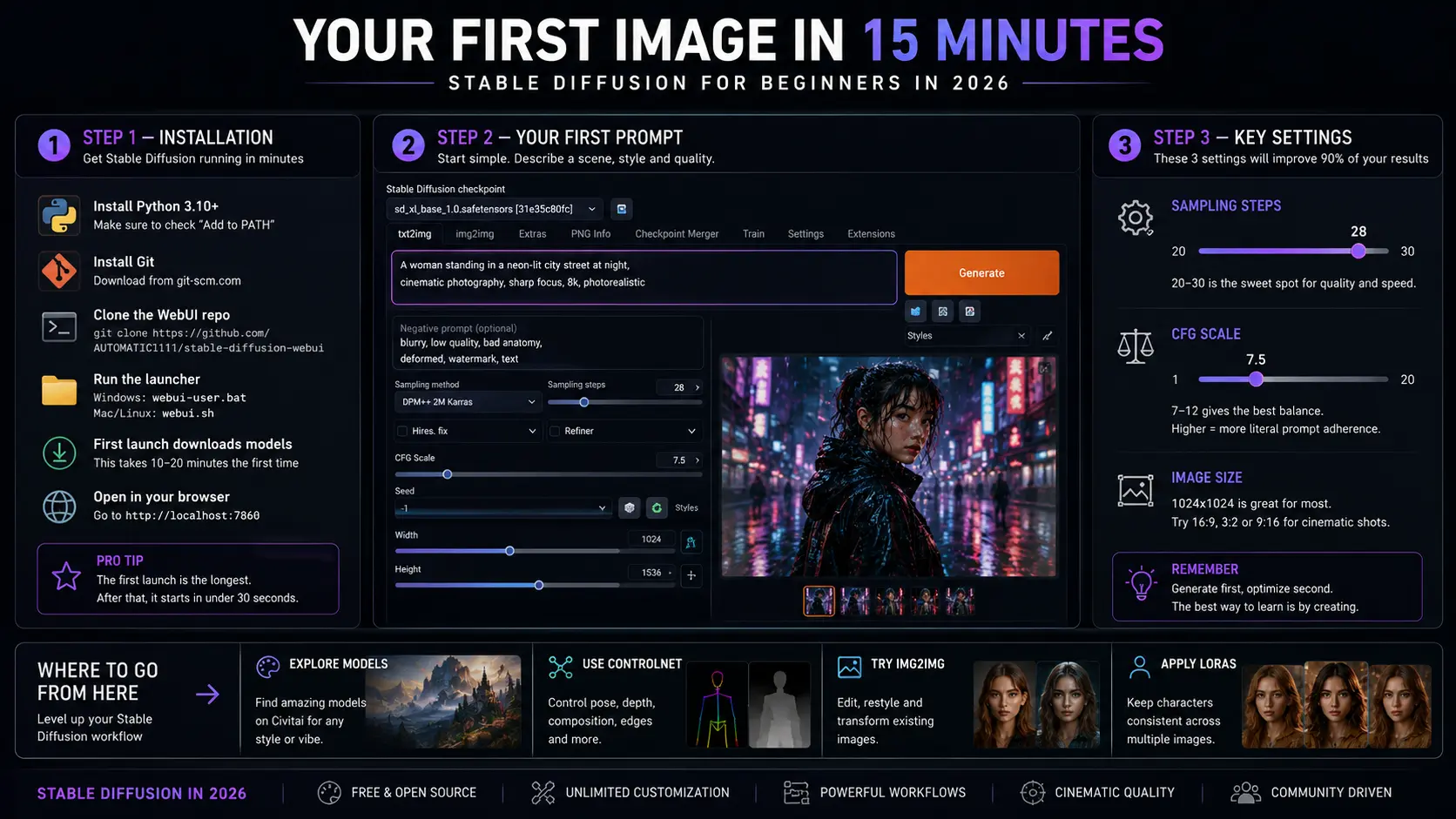
- 1Install Python 3.10+
- 2Install Git
- 3Download AUTOMATIC1111 or ComfyUI
- 4Install your preferred SDXL model
- 5Launch the interface locally
- 6Start generating your first cinematic AI images
Step 2 — Your First Cinematic Prompt
Modern Stable Diffusion models respond best to cinematic prompts with atmosphere, lighting, composition, and realism direction.
"Cinematic portrait of a cyberpunk woman in rainy Tokyo at night, neon reflections, volumetric fog, dramatic rim lighting, shallow depth of field, ultra realistic skin texture, cinematic photography"
— Example Stable Diffusion Prompt
The Most Important Settings
Most beginners overcomplicate settings immediately. In reality, only a few core settings matter when starting.
- Sampling Steps: 20–35
- CFG Scale: 6–10
- Resolution: 1024x1024 or cinematic aspect ratios
- Sampler: DPM++ 2M Karras
- SDXL models for highest modern quality
The Biggest 2026 Upgrade: ControlNet & LoRAs
ControlNet and LoRAs completely changed the Stable Diffusion ecosystem. ControlNet allows creators to guide poses, depth, composition, and camera framing, while LoRAs make consistent characters and visual styles possible.
This is one of the biggest reasons Stable Diffusion remains central to AI filmmaking, AI thumbnails, concept art, cinematic storytelling, and advanced image generation workflows.
"Stable Diffusion stops being a toy the moment you understand ControlNet."
— Mihaly, Boldly with AI
Where Beginners Should Go Next
- Learn cinematic prompting techniques
- Explore photorealistic SDXL models
- Use LoRAs for character consistency
- Experiment with ControlNet composition workflows
- Try img2img for cinematic editing and style transfer
- Build AI filmmaking pipelines using ComfyUI
Stable Diffusion in 2026 is no longer just an AI art tool — it's a complete creative ecosystem for filmmakers, designers, YouTubers, and digital creators.